I'm doing my first link up - how fun! I ran across this linky party from Freebielicious today and it looked like so much fun, so I'm joining in!
Only thing is, I'm a day late and a dollar short. So, here's my Must Have Monday... on a Tuesday!
Since I'm late, I'll just share one quick must-have with you...
planbook.com
Do you all use this? Have you heard of it/seen it?
I started using it 3 years ago and it has been life-changing! These aren't my plans, just screen shots found online, but you get the picture.
 What I love about it:
1. I just copied my entire lesson plans from last year onto this year with a click of a button. What?!?! This is such a huge time saver. I can simply go in and make any necessary changes based on curriculum changes, changes in the calendar, etc. But the basic curriculum mapping is all done including all the detailed lesson plans for each day.
What?! You need more reasons? Okay, but that was a big one for me!
2. It's super simple to use. Even if you're not a techy teacher.
3. You can "bump" a lesson back a day and it will just move all subsequent plans back a day for any given subject. Or, you can extend a lesson into the next day. In other words, no bothersome cutting and pasting. Who has time for that? Not me.
4. You can look up standards by state and subject and simply click on them to fill them in, rather than type them out manually. You can also set it to view the standards within your plans or just list the standard number.
5. You can print out plans by day, week, month, or by subject. You can also save them as a PDF, which is what I do when I need to submit them to my principal.
6. You can change the colors! That's so important, isn't it? Ha! We do like our pretty, don't we? You can also change the font.
7. You can attach pictures and files right into your lesson, then click on them to open.
8. You can keep your planbook open on your school computer, or iPad, for reference, rather than printing out plans (i.e. wasting paper). You know, for those times when the administrator walks in and wants to see those plans out. Ahem.
9. You can set it to display as much detail as you want, or you can collapse it to just show headings for each lesson/subject. You can show homework, notes, standards, etc. or hide them from view to make it look more concise. It just depends on how much you want to view at one time.
I'm sure there are other things to love about Planbook, but since it's summer and I'm not using it much, I can't think of any others presently. :)
10. I lied. Let's round this to 10 things I like about Planbook and include the fact that it only costs $12 a year to subscribe. That's $1 a month, people. #worthit
Have an awesome day!
What I love about it:
1. I just copied my entire lesson plans from last year onto this year with a click of a button. What?!?! This is such a huge time saver. I can simply go in and make any necessary changes based on curriculum changes, changes in the calendar, etc. But the basic curriculum mapping is all done including all the detailed lesson plans for each day.
What?! You need more reasons? Okay, but that was a big one for me!
2. It's super simple to use. Even if you're not a techy teacher.
3. You can "bump" a lesson back a day and it will just move all subsequent plans back a day for any given subject. Or, you can extend a lesson into the next day. In other words, no bothersome cutting and pasting. Who has time for that? Not me.
4. You can look up standards by state and subject and simply click on them to fill them in, rather than type them out manually. You can also set it to view the standards within your plans or just list the standard number.
5. You can print out plans by day, week, month, or by subject. You can also save them as a PDF, which is what I do when I need to submit them to my principal.
6. You can change the colors! That's so important, isn't it? Ha! We do like our pretty, don't we? You can also change the font.
7. You can attach pictures and files right into your lesson, then click on them to open.
8. You can keep your planbook open on your school computer, or iPad, for reference, rather than printing out plans (i.e. wasting paper). You know, for those times when the administrator walks in and wants to see those plans out. Ahem.
9. You can set it to display as much detail as you want, or you can collapse it to just show headings for each lesson/subject. You can show homework, notes, standards, etc. or hide them from view to make it look more concise. It just depends on how much you want to view at one time.
I'm sure there are other things to love about Planbook, but since it's summer and I'm not using it much, I can't think of any others presently. :)
10. I lied. Let's round this to 10 things I like about Planbook and include the fact that it only costs $12 a year to subscribe. That's $1 a month, people. #worthit
Have an awesome day!
Do you do Daily 5? Here are the scheduling cards I use. My students use them to make a choice during each round of Daily 5. They simply select a station and put the card in their pocket (labeled with their name).
You can read more about how I use these here.
To grab the scheduling cards for FREE, visit my TPT shop.
Have an awesome day!
A little FREEBIE for you on the blog today. Print these labels out and use them to label your pencil containers. There are a couple of different wording options, depending on your preference. Enjoy!
Visit my TPT shop to download these free Pencil Labels.
Developing number sense is so important in the primary years. One of the ways I help my students with number sense is through extra practice using the 120 chart.
In case you're wondering... "What's a 120 chart?", it's just like a 100 chart most of us teachers have hanging somewhere in our classroom, except it goes to 120 now.
 Since the adoption of Common Core standards in many states, in first grade we now teach numbers up to 120.
Good thing, too, because I always have a group of students who get stuck going from 100 to 101 or from 109 to 110. They write 101 as 1001 or 110 as 10010. Do your students do that, too, or is it just me? Ha!
Since the adoption of Common Core standards in many states, in first grade we now teach numbers up to 120.
Good thing, too, because I always have a group of students who get stuck going from 100 to 101 or from 109 to 110. They write 101 as 1001 or 110 as 10010. Do your students do that, too, or is it just me? Ha!
I made these 120 chart puzzles with my own students in mind. {Excuse very ugly table they are sitting on, please.} I use them in small groups to give those students the extra support they need for mastery, and I also use them as math centers or for early finishers to grab and go.
I'm pretty sure you do have students like mine who need extra practice, so I have uploaded my 120 Chart Puzzle packet to TPT. There are 12 different puzzles - each in a different color making it easier to find where missing pieces go. It also includes a 200 puzzle, which kids can use to build the entire 120 chart or go beyond to 200. Simply include the numbers you'd like them to go to. My kids love to work on the 120 chart together in groups of 2-4.
I hope you and your students enjoy working with these puzzles!
Have an awesome day,
Shout out to Designs By Tenille for giving me a blog makeover! It was so fun to give her my color scheme and ideas and then have her creatively design a look that was precisely what I wanted! Thanks so much, Tenille!
I think it's stinkin' cute! What do you think of my new look? Comment below!
I've added another color / pattern to my growing collection of desk tags available in my TPT shop. I just love the way these Turquoise Chevron tags turned out. These are EDITABLE, meaning directions are included to be able to type in your students' names.
There are 48 different kids / images to choose from. Imagine being able to personalize desk tags for your students with their name and a kid resembling them. My students loved coming in to our back to school night, finding their desk and a name tag with a kid on it that looked kinda like them (i.e. hairstyle, hair color, and skin color). Here are a couple of examples from my own classroom.
I used the Red Chevron pattern in my room to go with my décor. There are lots more chevron and polka dot patterns and colors to choose from in my TPT shop. Have a look!
New Classroom Nameplates have been added to my TPT shop. These are in Pink Polka Dots and are EDITABLE! Use for desk tags this school year by typing in your students' names or use them to label drawers, cabinets, bulletin boards, etc.
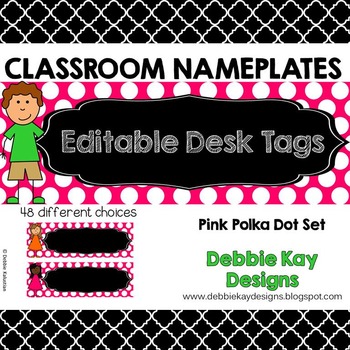 To see these and more colors/patterns, visit my TPT shop.
To see how I use them in my classroom, see this post.
To see these and more colors/patterns, visit my TPT shop.
To see how I use them in my classroom, see this post.


